
14 min read
Outreach Playbook
The ultimate guide to booking sales calls with LinkedIn outreach. This playbook will show you exactly how to find customers, start conversations, actually get replies, and get a steady stream of calls booked. I'll be sharing best practices, tools, and example screenshots so that you have everything you need to generate more pipeline.
Introduction
Most outreach on LinkedIn fails.
Messages go unread. Conversations don’t start. And even when someone does respond, it’s usually just a polite "no, go away."
I've been there.
In 2024, I spent weeks firing messages into the void and got absolutely nowhere.
It sucked. No wait, I sucked. It was hard, embarrassing at times.
It took me months of trial and error before I finally cracked it.
The problem wasn't LinkedIn.
The problem wasn't because "outreach is dead".
The problem was I was treating LinkedIn like 99% of GTM teams - like an email list, sending generic, templated messages to anyone who fits their ideal customer. Which worked, once upon a time. Probably.
But not anymore.
Here’s what I had to learn (the hard way - as a result of getting it wrong):
LinkedIn isn’t an email inbox. It’s a social platform, and people expect something real, more authentic. If you're like me, you're beyond saturation point with ‘cold pitches’ and getting 'pitch-slapped' by every Tom, Dick and Harry.
There's good news though. There’s a better way.
And that's what this playbook is all about.
So you can learn from my mistakes, avoid wasting time guessing at what to do, and actually get results.
I'm going to show you how I generate 5-10 conversations everyday, how I booked 22 high-ticket sales calls last month using this very system.
It’s the same system that got one of our clients 105 sales calls in just 6-8 weeks.
In fact, here's the email that Simon [our client] wrote referring us to an associate ↓
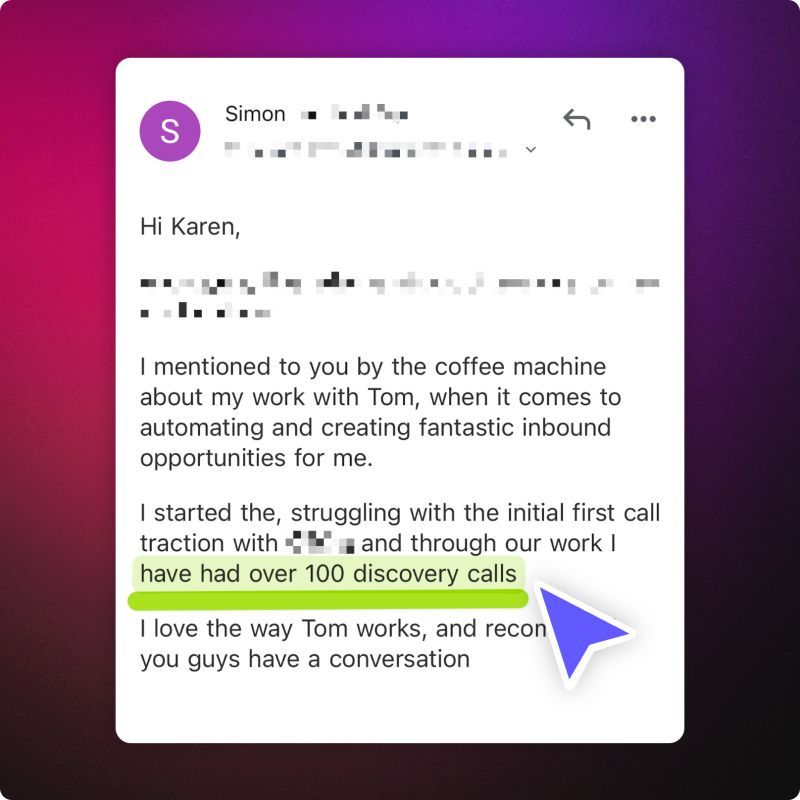
Instead of firing cold pitch after cold pitch to complete strangers - you warm them up first.
We'll be covering how to take a cold lead and make them warm, and how you can focus on the people who have ‘already shown interest’. People who have engaged with your content, viewed your profile, or followed you, and so on.
The warmer the lead, the more likely they'll respond, start a real conversation, and ultimately book a call, sign up or subscribe to what you offer.
I’ll break down a structured, repeatable process you can use to:
- Find the right prospects without scraping lists or relying on bad outbound automation
- Start personalized conversations that actually lead to calls or signups
- Qualify leads without making them feel like they’re being interrogated (and burning a bridge)
- Book more sales calls without sounding ‘salesy’, pushy, desperate, or finding it cringey
If you’ve been feeling stuck, struggling to turn LinkedIn conversations into booked meetings, I’ve spent a long time testing, troubleshooting and falling flat on my face on your behalf.
I hope this single playbook can save you hours of wasted time, so that your efforts start giving you a measurable ROI.
Let’s get into it.
Why warm outreach works better than cold outreach.
Most LinkedIn outreach fails because it’s cold and impersonal.
People are bombarded night and day with copy-pasted connection requests and endless, lazy cold pitches disguised as friendly intros. The bar is on the floor where "personalization using AI" is concerned.
So people have learned to ignore all messages that feel automated, or even remotely scripted.
The issue with cold outreach is that it forces you to convince strangers to talk to you. That’s hard. Even with a killer message. Warm outreach does the opposite. It leverages existing engagement to start conversations with people who already know who you are, to some degree. And that’s much easier.
The difference (in a nutshell)
Cold outreach:
- Sending messages to people who have never heard of you
- Relying on generic templates that could be sent to anyone
- Getting ignored 99% of the time
Warm outreach:
- Messaging people who have already engaged with you in some way
- Making every message personal and relevant
- Getting a much higher response rate because they recognize your name
But where to start?
Where to find warm prospects on LinkedIn
We’ll get into this in more detail shortly, but your best leads are ‘already interacting with you’, you just need to know where to look.
Instead of wasting time on pitching completely cold prospects, I focus on people who are already somewhere in my orbit. That alone massively increases my odds of getting responses.
Here’s how:
Step 1: Finding the right prospects
Remember, the goal here isn’t to build and blast a massive list of 1M+ ‘ideal prospects’. Believe me, the 'spray and pray' approach is as effective as doing this:
“Surely one went in!?”
“Surely we’ll get one sales call… surely!?”
No.
You won’t.
It doesn’t work.
You’ll never get leads this way.
At best, a handful of unqualified calls.
If you’ve tried the spray and pray approach before, you don’t need reminding of the frustration you felt. And if you’re thinking of trying it, I’m about to save you hours of headache (and heartache).
The goal is to identify a focused group of high-quality prospects, people who are already aware of me and are most likely to engage in a conversation.
Here’s how I find them in Flow AI:
Flow AI’s lead search
Flow lets you search for ideal prospects using the same filters you’d find in Sales Navigator (role, industry, company size, geography, and more), plus a few extras like profile keyword filtering and AI-powered natural-language search. You build a targeted list, add them to an outreach campaign, and Flow AI takes care of the warm up, visiting their profile, engaging with their content, and sending a connection request, all spaced out over days so it looks and feels natural. By the time you message them, you’re not a stranger.
Describe your ICP in the AI search bar (e.g. “Sales leaders in SaaS, based in California, at companies with 10+ employees”), then narrow it down with advanced filters. Flow mines a database of 300+ million profiles, so there’s no Sales Navigator or third-party app required. You can also use signals like whether they’ve changed jobs, posted recently, or viewed your profile, and much more. Then tick anyone worth talking to and save them to a list. You can also do all of this straight from ChatGPT or Claude, more on that later.

The people already in your orbit
Your warmest leads are the people already interacting with you: they’ve viewed your profile, engaged with your posts, or recently followed you. Flow AI’s search signals can surface people who’ve viewed your profile, and the 1st-degree filter shows which of your existing connections fit your ICP. When someone who fits engages with one of your posts, paste their LinkedIn URL into Claude or ChatGPT and ask it to add them to your list.
Prioritizing outreach: Warmest to least warm
Not all warm leads are created equal. Some are hotter than others, and it makes sense to prioritize them in the right order.
I break my outreach into three levels:
- Hottest prospects: Profile viewers
- Warm prospects: People who engaged with my content (commenters first, then likes)
- Lukewarm prospects: Recent followers who haven’t engaged yet (including any new connections from your Flow lists)
Having tested this a while, here's something interesting - connection requests that get accepted will often cause the prospect to check out your profile -which makes them a much warmer prospect. Why? Because when you send them your first message, you're not a complete stranger.
I always start with the hottest prospects first before moving down the list. This increases my chances of quick wins and keeps my pipeline filled with high-quality conversations.
Before moving on to the next step, I aim to gather at least 20-30 high-quality prospects to prospect that week (around 5 a day). This gives me enough volume to work with without overwhelming myself.
The good news? Flow AI follows this same priority logic. It works the warmest prospects first and moves down the list, so you get the quick wins without having to manage the sequencing yourself.
Next step: Now that I have my list, it’s time to warm them up, record and track everything.
Step 2: Warming up prospects and tracking them in a pipeline
Once I’ve identified my prospects, the next step is warming them up and tracking them properly. Keeping my outreach organized prevents leads from slipping through the cracks, helps me stay consistent, and makes follow-ups much easier. And let's face it - LinkedIn DMs aren't the best user experience. It quickly gets messy - so we need a system.
A scattered outreach process leads to missed opportunities. Without a system in place, it’s easy to lose track of conversations, forget who I’ve already messaged, or fail to follow up at the right time.
Warming them up with Run Outreach
Add prospects to a list and Flow runs a multi-step engagement sequence automatically: profile visits, post likes, and connection requests, spaced out over days to mimic natural behaviour. All within safe daily limits so your LinkedIn account stays protected.
Open Run Outreach, pick the list, select the connected LinkedIn accounts you want to rotate, and click Run Outreach. You can pause, resume or rewrite a campaign at any time without losing progress.

If you have a team, Flow rotates prospects across multiple sender accounts so you can scale without any one account hitting LinkedIn’s limits.
Turn connections into warm prospects. Once they accept, they automatically become a follower by default.
That means:
- They start seeing my content in their feed
- I can engage with theirs
- We both build familiarity before any direct conversation starts
Done consistently, this keeps my pipeline full of fresh, relevant prospects. Every new connection is a silent “yes”, an opening to warm them up over time.
Tracking everything in Connections
I use Flow AI's built-in CRM for tracking my LinkedIn outreach. It pulls in every connection, conversation, and status update automatically, so I don't have to copy-paste profile URLs into a spreadsheet or bounce between tabs.

Flow pulls all your LinkedIn conversations into one unified inbox, across every sender account, so you’re not jumping between profiles to find threads.
By recording and tracking everything, I:
- Always know exactly who I’ve reached out to and when
- Can follow up strategically instead of randomly
- Have a clear view of my progress and response rates
Flow’s CRM automatically tracks conversations with ideal buyers and nudges me to follow up using smart logic based on buyer intent, ICP-fit, time since the last message, and so on. Connections flow in automatically once a prospect accepts, so there’s no manual data entry. Every lead has a status, a list, and a full conversation thread attached.
Personally, I’ve always hated this side of prospecting - the boring admin work. Flow takes that completely off my plate. It frees me up to focus on what actually matters: starting conversations and booking sales calls. And the best part? I never have to worry about missing a lead or leaving money on the table.
With my pipeline set up, I’m ready to start creating my first outreach message.
Step 3: Creating the ice-breaker
Now that I have my list of prospects, it’s time to create the first message / aka. ‘icebreaker’. This is where a lot of outreach goes wrong.
The goal isn’t to sell or pitch immediately. It’s to start a genuine conversation that can lead to a booked call.
What the first message should accomplish
The first message needs to do two things:
- Break the ice with a personalized compliment – this shows the message isn’t copy-pasted and makes the prospect more likely to engage.
- Ask a qualifying question (which we’ll cover in the next step) – this moves the conversation toward discovering a potential pain point or challenge.
Writing a personalized compliment (the first part of your message)
A personalized compliment makes the message feel genuine and shows that I’ve put thought into reaching out. It should be specific, short, and relevant to the prospect.
Why?
Without this personal touch, you're violating a fundamental, age-old rule that most modern-day sales professionals have completely forgotten about.
I think it was best put by Earl Nightingale from ‘Lead the Field’ (circa ~1950). And I quote…
“Have you ever stopped to think of this. Every human being on earth is the most important human being on earth, as far as he or she is concerned. You may never get anyone to admit it, but it’s a fact. There’s nothing in the world that men, women, and children want and need more than the feeling that they’re important, that they’re seen, validated, needed and respected. They will give their love, their affection, their respect, and their business to the person who fills this need… ”
In recent years, quotas, 'signal' data and balance sheets have taken precedence over some very basic fundamentals. It plagues most sales and marketing teams today.
So, where to find something to compliment:
- Recent content – If they’ve posted something interesting, highlight it.
- Their profile – Look at their About section, experience, or any awards/achievements.
- Their product or service – If they have strong offer, cool features or great branding, mention it.
- Common ground – If I see something we share in common (e.g., industry experience, mutual interests), I’ll reference that.
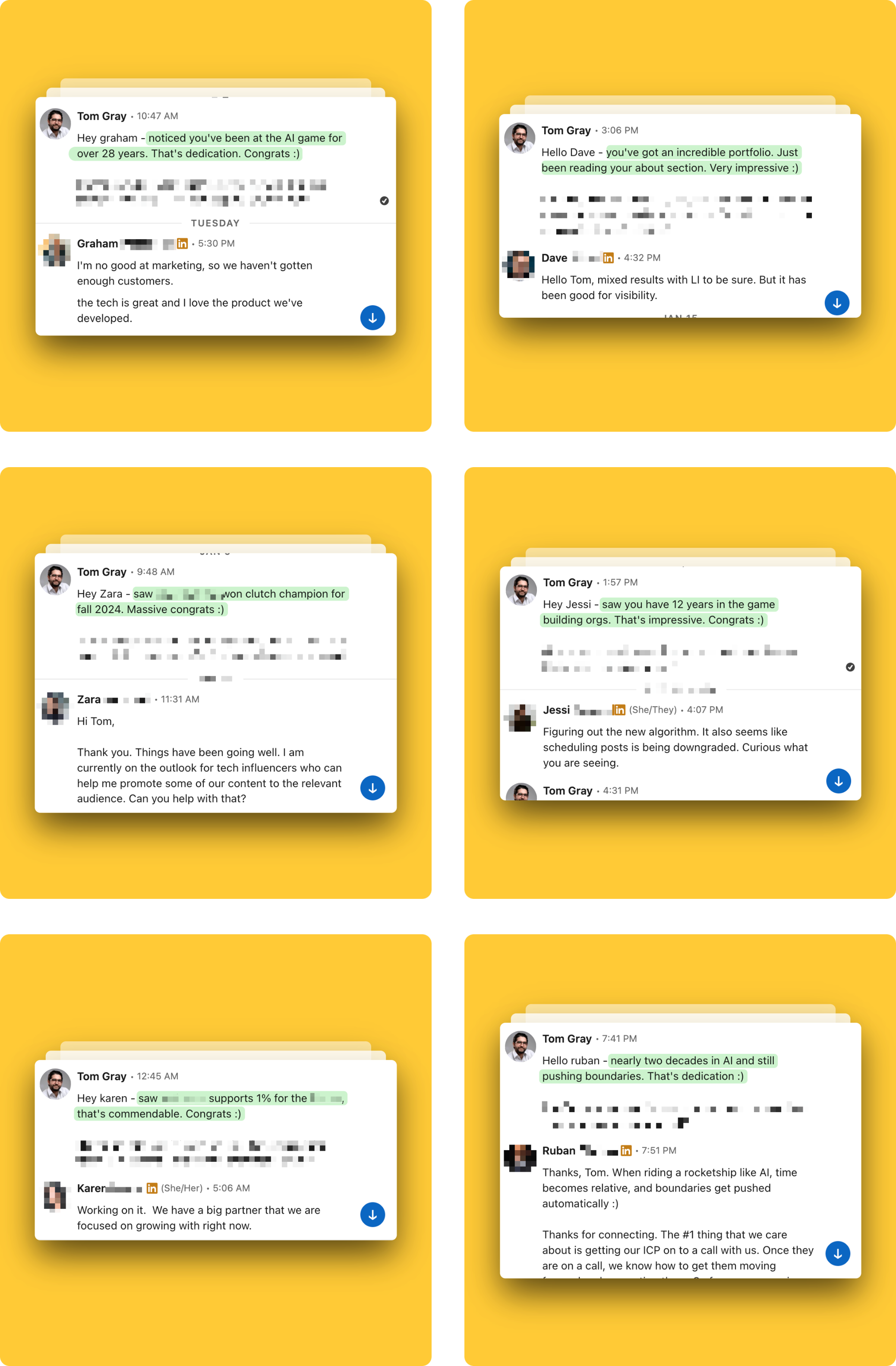
In my honest opinion, these aren't the best ice-breakers I've written (I'd say they're pretty average), but you can see that simply acknowledging prospects triggers a completely different response, when done right.
All you have to think about is - how do I make this specific person feel seen, feel recognised, or significant?
Guidelines for writing a good compliment
- Be specific – Instead of “I liked your post,” say, “I loved your take on [specific topic]. Especially what you said about [xyz].” If it can be copied and pasted for anyone, it’s likely going to have less impact.
- Keep it short – A couple of lines are enough. Long compliments can feel forced. I try to stick to a rule of max 2-3 lines for both my ice-breaker compliment and qualifying question.
- Make it relevant – Compliment them on something they likely care about (e.g., a founder will care deeply about their product, not their favorite TV show). Always relate it to professional topics that matter most to their role as CEO, VP of Marketing, etc.
- Avoid being overly formal – This should feel conversational, not like a corporate email. Use simple language, no jargon or clunky corporate speak. ‘8th grade-level English’ will get much better results (… works great as a ChatGPT prompt too).
Examples of good compliments:
“Hey [Name], nice profile!”
“Hey [Name], I enjoyed your recent post on scaling teams. I think we all wish we'd learned the "hiring slow and firing fast" principle sooner :)”
“Hey [Name], great job on your branding.”
“Hey [Name], the branding on your site is killer. Just watched your video on [provide specific reference]. Congrats :)”
Tip: In Flow, Co-pilot can help here. It reads the prospect’s LinkedIn profile and recent activity, then suggests a personalized compliment based on what it finds. You still review and tweak it before sending, but it cuts the research time down to seconds.

When you’re new to warm outreach, it always involves a bit of trial and error, and sometimes leading with a compliment alone is enough to open the conversation:
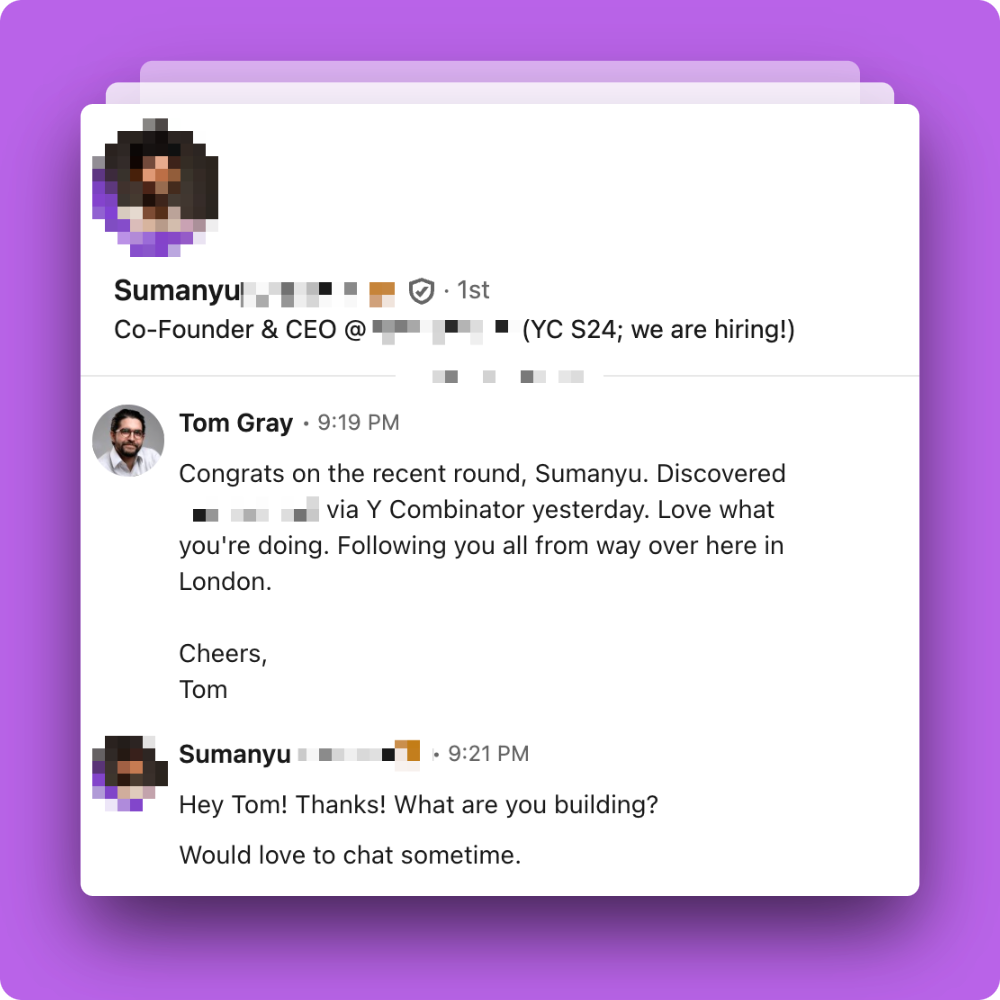
Avoiding common mistakes
- Don’t make the message too long – The prospect should be able to read it at a glance.
- Don’t jump straight into a pitch – This feels pushy and turns people off, always. Save the pitch for the sales call.
- Don’t use overly formal language – LinkedIn is a social platform, so the tone should be conversational.
- Don’t send generic compliments – If the message feels copy-pasted, they’ll know, and it’ll likely be ignored.
With my icebreaker ready, the next step is defining the qualifying question that completes my outreach message.
Step 4: Defining an outreach question that works (with examples and screenshots!)
Now we get to the part you've been waiting for.
Here’s the formula we’ve used to get as high as a 50% response rate for specific campaigns. This is a typical week, give or take ↓

(Of course, these results depend on having key elements in place: like a compelling offer, the right message, well-defined target audience, authoritative content, and so on).
Now, important thing to remember - most LinkedIn outreach fails because it’s either too aggressive, too ‘salesy’, too jargon-y or AI-sounding, or too vague.
Some messages jump straight into a pitch, which turns people off immediately. Others are so open-ended that they give the prospect no reason to respond.
A good outreach message needs to do two things:
- Make it easy for the prospect to reply - the simpler the question, the better.
- Lead naturally to a sales conversation - without making the prospect feel like they’re being sold to.
The best way to achieve both is to ask a qualifying question that uncovers a goal or pain point.
The structure of a good qualifying question
N.B. this step (step 4) will only work if it’s paired with a strong ice-breaker from the previous step. A good qualifying question is only half the fight.
Now I use a simple formula for my outreach question:
“How’s [goal / outcome you provide] progressing - is it going well / proving fruitful?”
This question works because:
- It’s easy to answer – It’s a yes/no question, which removes friction.
- It quickly reveals if they have a problem – If things aren’t going well, they’ll tell me.
- It naturally leads to a follow-up conversation – I can continue the discussion based on their response.
Examples of effective outreach questions (with real-life screenshots)
The specific goal I reference depends on what I help clients with. Here are a few examples:
- If I help companies with lead generation:
“How’s LinkedIn lead-gen going for you and the team - is it going well / proving fruitful?”
- If I help executives with leadership coaching:
“How’s team performance been lately for you as [title] - are they smashing it?”
- If I work in AI and automation
“Mind me asking how AI has been impacting you - is it proving fruitful / been easy to implement?”
The goal is to ask a question that makes the prospect think, “Actually, things could be better…”
- If they have a problem, they’ll likely mention it.
- If they’re doing well, I can pivot the conversation by asking about their next goal (which I’ll cover in the messaging step).
Here’s the qualifying question I typically use:
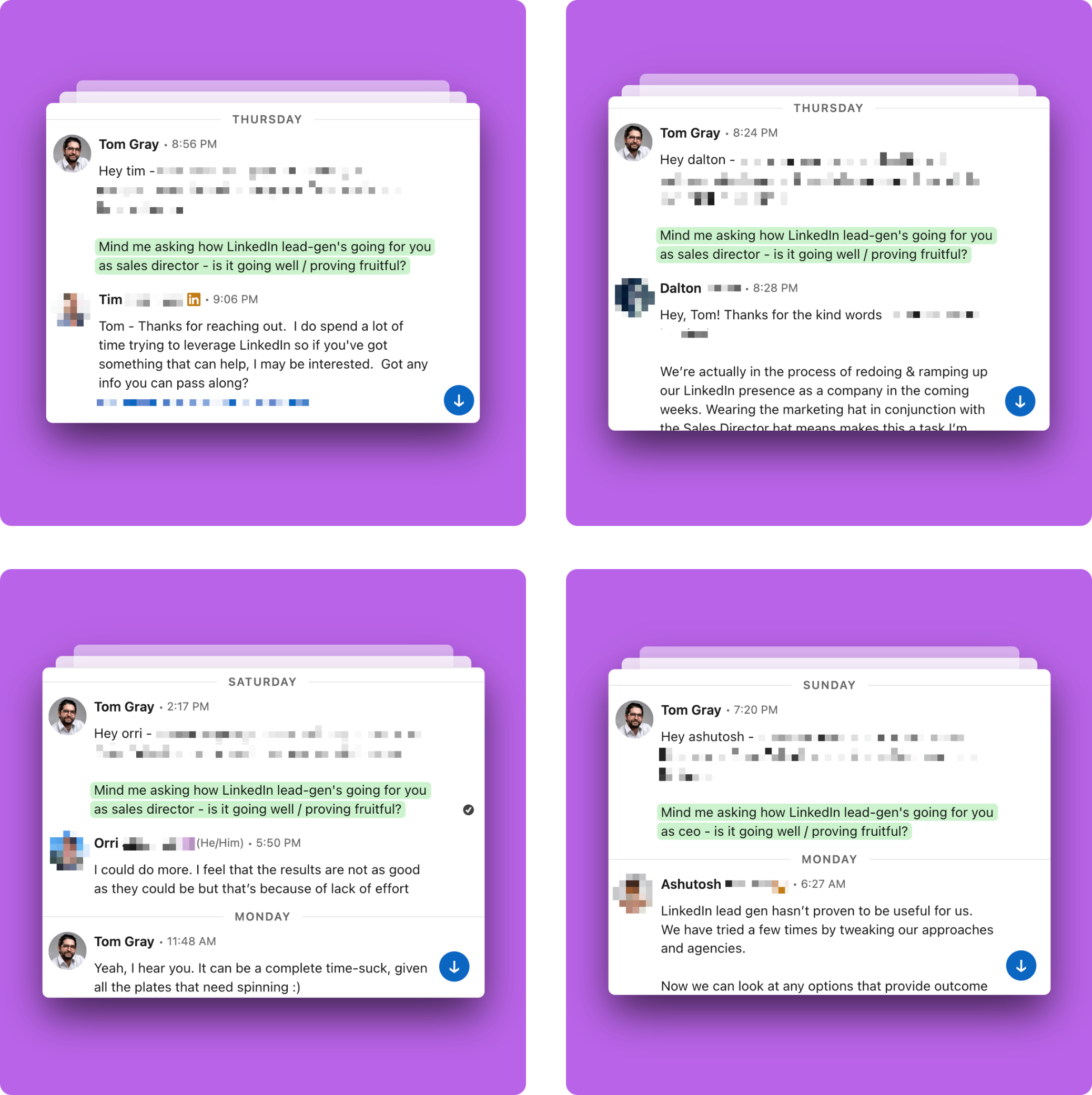
Why this works better than generic outreach
Most outreach messages either:
- Go straight into a pitch (“We help companies generate more leads. Our company is [very prestigious], and we’ve helped [all these clients]. Let me know if you’re interested.”)
- Are too broad to spark a conversation (“How’s business going?”)
A good outreach question sits in the middle, specific enough to be relevant, but open enough to encourage a reply.
Once I’ve defined my outreach question, I’m ready to combine it with my icebreaker and send the first message.
Putting it all together
Now that I have my compliment and qualifying question, I combine them into a simple, conversational message.
Template for the first message:
“Hey [Name] - [compliment] :)
How’s [goal] going - is it going well?”
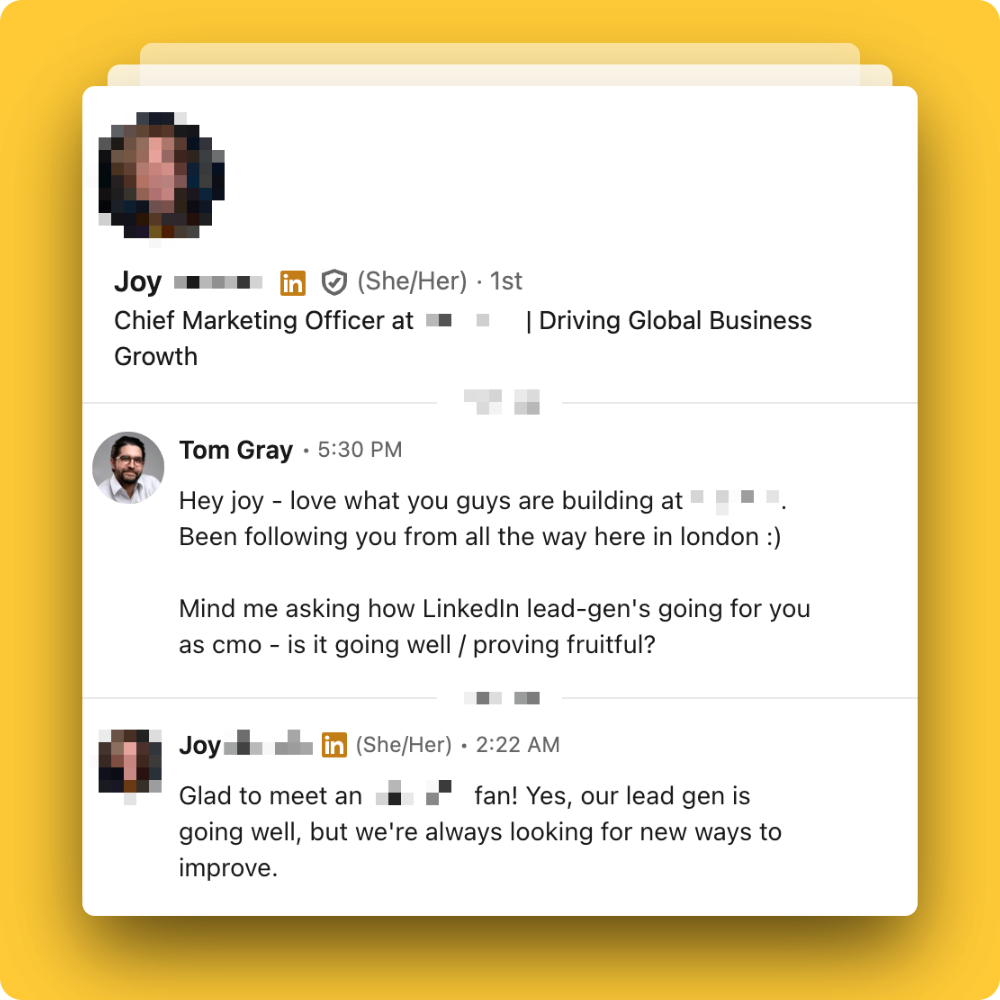
This message feels natural, opens the conversation, and leads the prospect toward discussing a potential challenge or goal.
Treat these templates as a starting point, not a script. It takes some experimenting. Sometimes a compliment on its own is enough to get the conversation going, no question needed. Test a few variations, see what gets replies from your ICP, then double down on what works.
Tip: Save this template as a Custom Prompt in Flow (Settings → Custom Prompts), with your compliment rules and qualifying question baked in. Turn on Auto Draft and the first message is already drafted when you open a new connection. You just review, tweak and send.

Step 5: Managing Replies
This is the bit people often find hardest. Once I send the first message, the real work begins.
Outreach isn’t just about sending DMs, it’s about managing responses to fully qualify the prospect and then guide the conversation toward a call. This is where most people either get stuck or come across as too pushy.
I break responses into two categories:
- They have a problem (ideal response) – Move toward a call.
- They don’t have a problem (or they say things are “going well”) – Dig deeper and shift the conversation.
How I respond depends on what they say, but the goal remains the same: keep the conversation moving and get them on a call.
Here’s a top shot of what the workflow looks like:
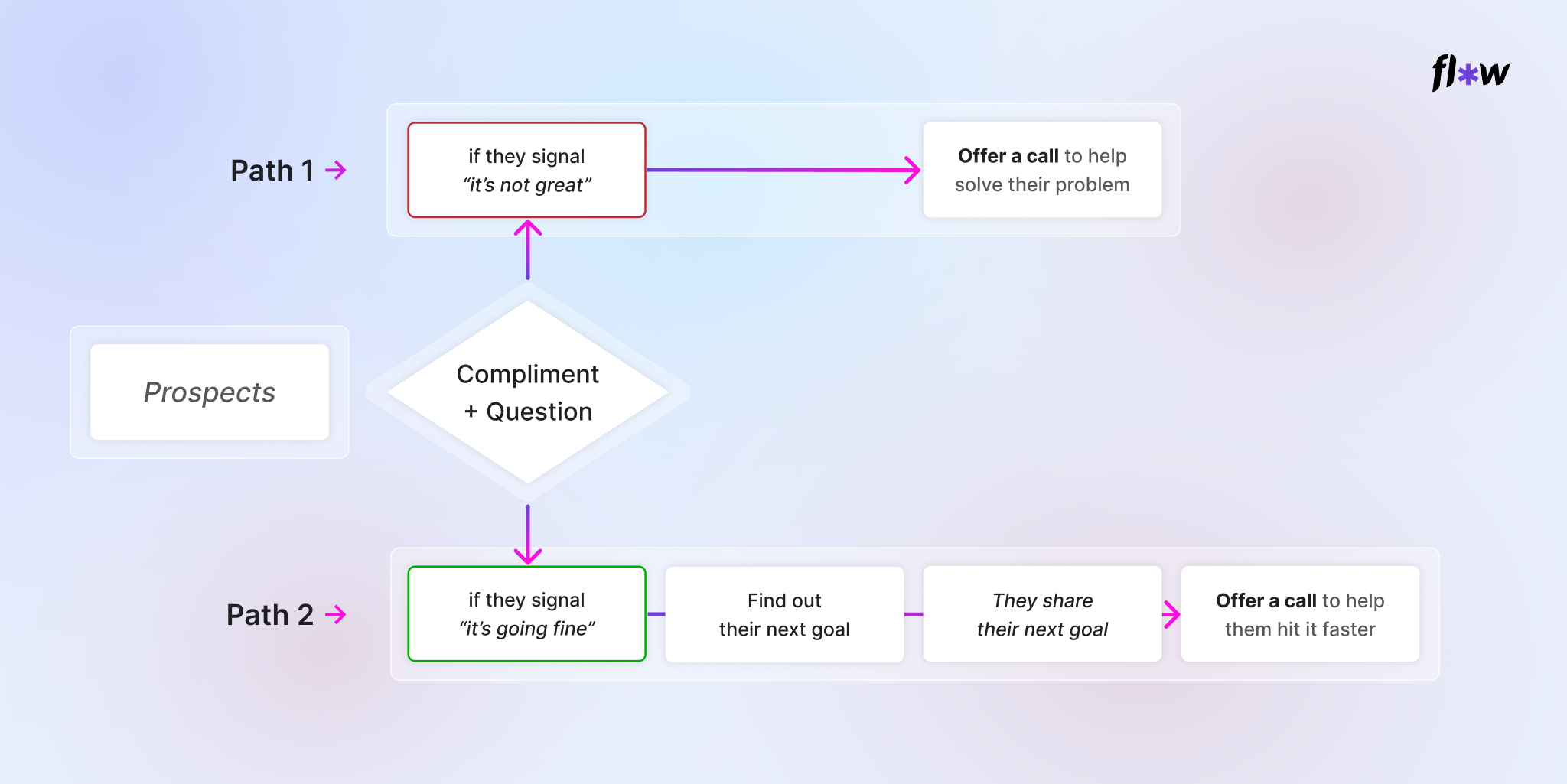
If they signal “it’s not great” (Path 1)
This is the best-case scenario. If someone says they’re struggling with their goal, they’re opening the door for a deeper conversation.
How to respond:
- Acknowledge what they said – This makes the conversation feel natural instead of transactional.
- Offer a call to help them solve the problem – Keep it low-pressure and framed as a conversation, not a pitch.
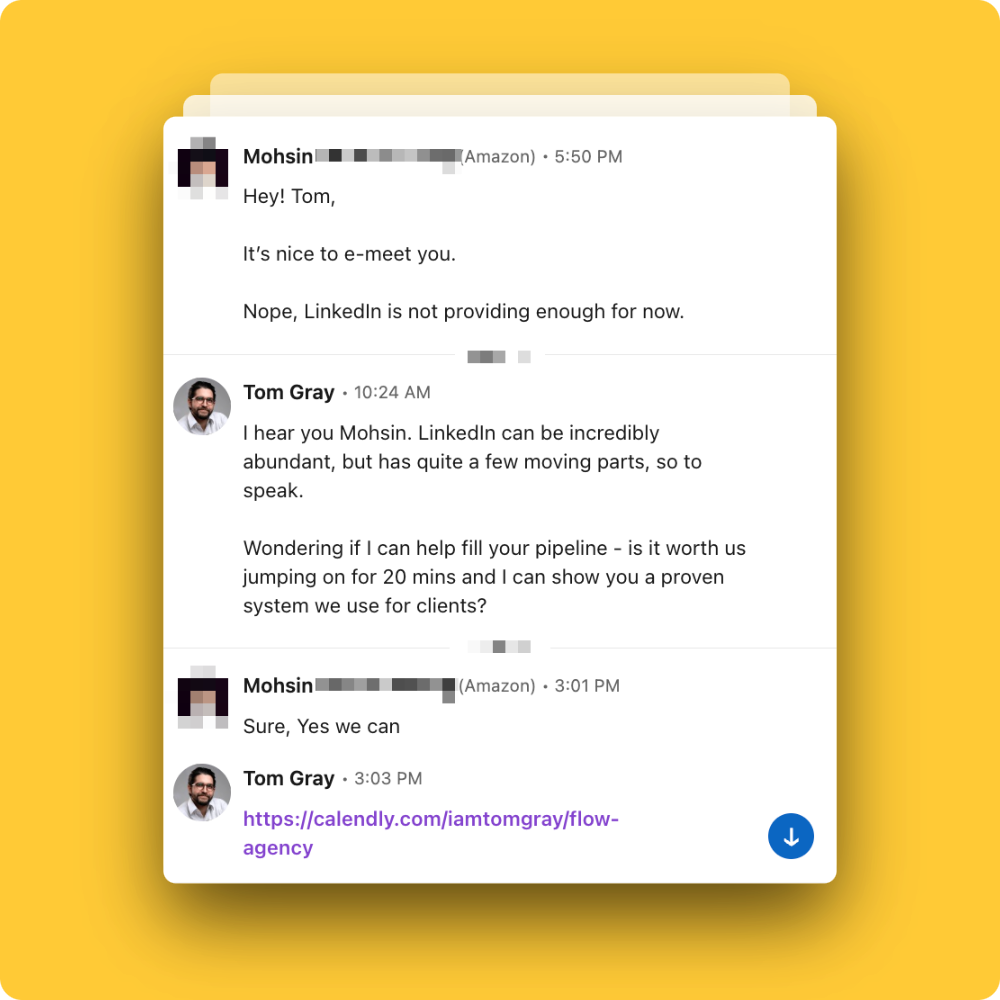
Acknowledge: “I hear you Mohsin :) LinkedIn can be incredibly abundant, but has quite a few moving parts, so to speak.
Ask for call: Wondering if I can help fill your pipeline - is it worth us jumping on for 20 mins and I can show you a proven system we use for clients?
If they signal things are “going fine” (Path 2)
Not every prospect will immediately admit to a problem. Some might say things are fine, even if there’s room for improvement.
Instead of ending the conversation (like the majority do), I shift the focus to their next goal.
How to respond:
- Acknowledge what they said – This keeps the conversation natural.
- Ask about their next goal – Give them multiple options to make it easier to answer.
Example response:
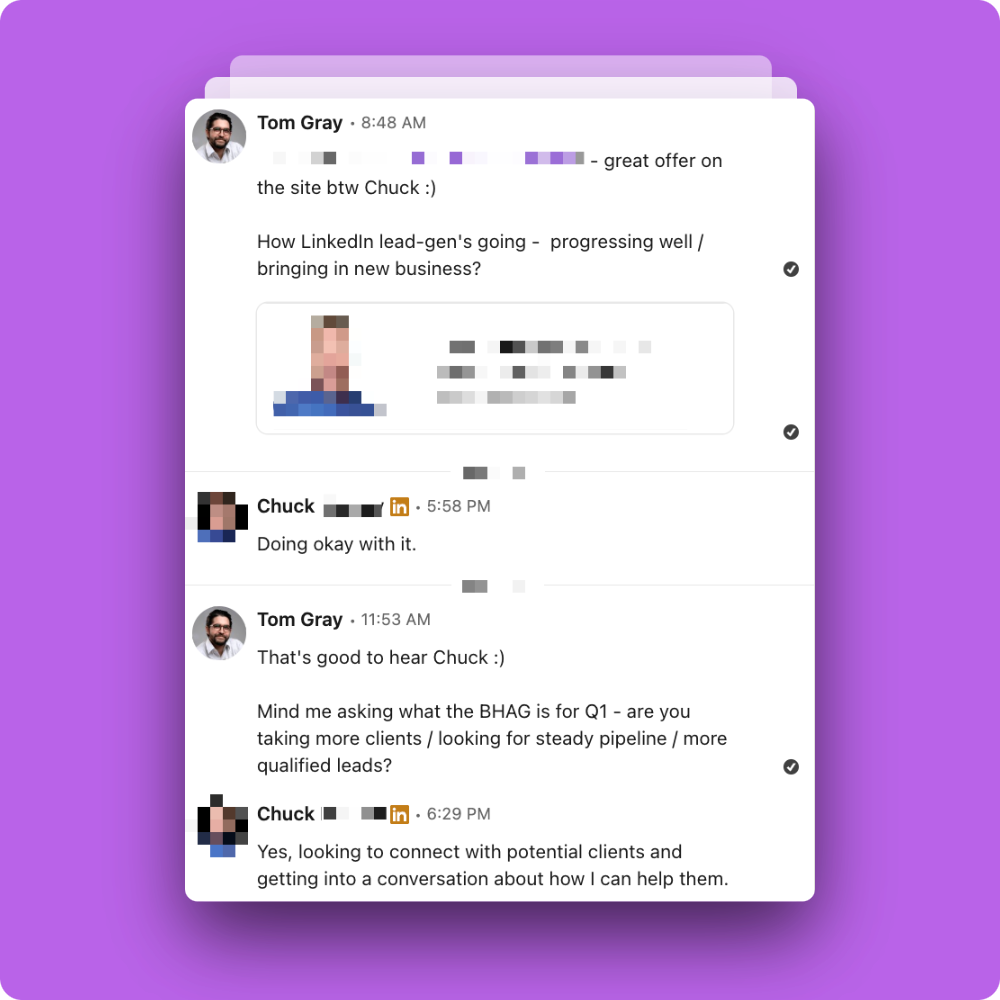
This works because it gently nudges them toward thinking about areas where they could improve. If they share a goal that aligns with what I help with, I can transition to a call.
The angle here is that “I’m helping them hit that goal faster”.
If they throw me a ‘curve ball’… (less common)
In the case above, it was a perfect fit (right timing, ideal customer profile, etc.). However, there will be times when prospects raise objections, or are on to you - and will simply ask you to "pitch it."
In the following example, I was asked exactly that after my outreach question. Dimitris didn’t answer the outreach question, but instead came back with: “What’s your offer?”
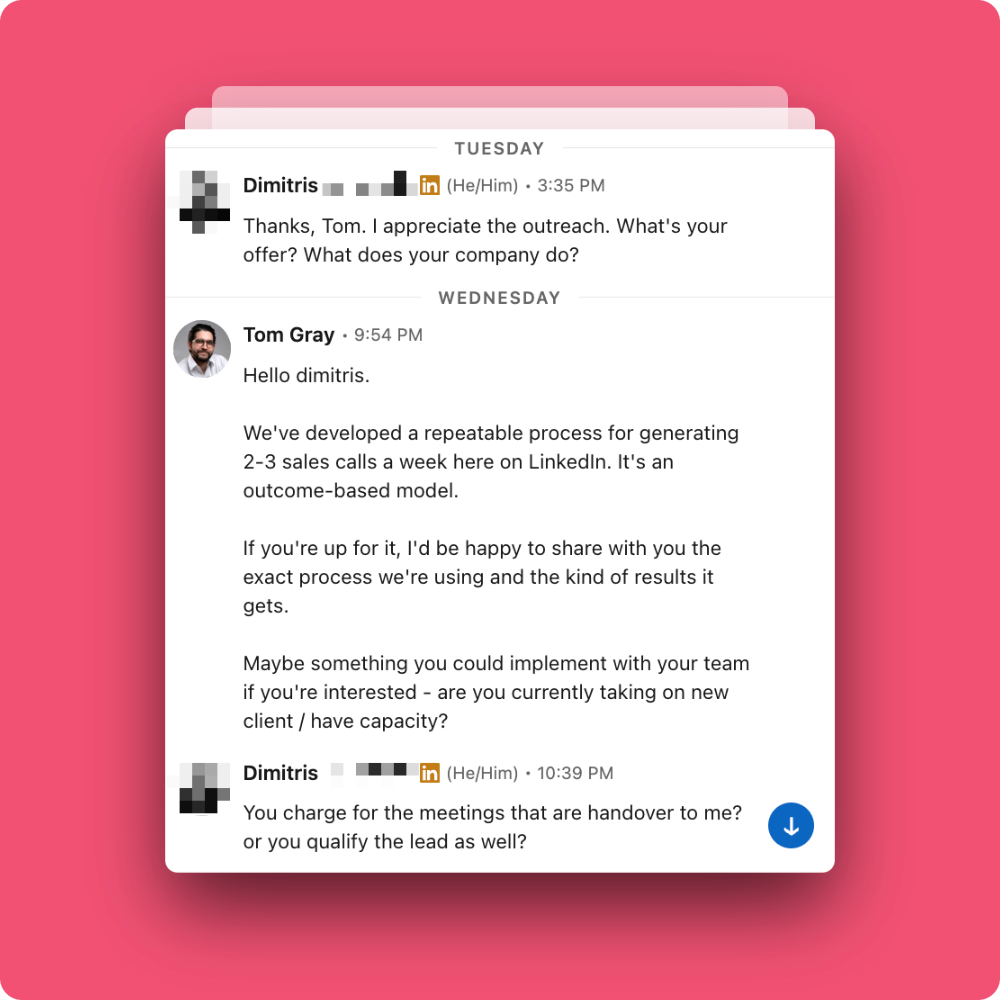
In this example, I’m still using the formula:
- Acknowledge what they said – This keeps the conversation natural.
- Ask a question – Give them multiple options, or to make it easier to answer.
As a general rule of thumb, if you end any message with a statement rather than a question, 9 times out of 10 - the conversation dies. Always round off your replies with a question that keeps the conversation moving towards the call.
(Imagine you’re a doctor ‘diagnosing the patient’. You ask questions to uncover pain so that you can provide the appropriate solution or followup question).
Remember, people love to talk about their problems, and they appreciate you being a listening ear.
Once they’ve replied to your qualifying question, it’s time to build a little credibility - without sounding like a sales pitch.
Drop one of these into a reply where appropriate to show you’ve been in their shoes (make it fit naturally):
The empathetic ‘social proof’ trick
- “yeah, I hear you. [LinkedIn lead gen] took months of painstaking trial and error before we finally cracked it. Can't lie - it's been a complete treasure trove”
- “yeah, I hear you. [LinkedIn lead gen] took months of painstaking trial and error before we finally cracked it. Actually just put a playbook together on it”
- “Yeah, makes sense. Same here - it took months of trial and error before we got AI really working for us. Now the team run themselves haha.”
This line builds curiosity - it’s name-dropping without name-dropping. Your next question might be something like “so what’s the big hairy goal this quarter?” Keep it conversational, not corporate.
Replying in Flow
Replies land in the Unread tab in Connections. Open the conversation and hit Draft.
Co-pilot reads the prospect's profile, your full conversation history, and your offer context, then drafts a reply following this proven playbook. You review and tweak before sending.

You'll find that after a few weeks you'll be reusing many of the same talking points, as most conversations will be slight variations of the same thing. In Flow, you can save these as snippets or custom prompts so they're one click away when you need them.

Once you’ve tested a few and started seeing what gets replies, make them your own. Tweak the tone. Add personality. You could even try using them inside Flow AI’s Custom Prompts. Remember, the best messaging never sounds like a template - they sound like you on your best day. The person that people really enjoy being around :)
Step 6. If they don’t respond (try these followups!)
Sometimes, a prospect will read the message and not reply. That doesn’t necessarily mean they’re uninterested, people are busy, and messages get buried. Despite us living in a golden era of tech, most of us have never been so time-poor.
I follow up once or twice.
How NOT to follow up.
The following approach worked for a time, but it won't anymore:
1. Old way: First follow-up (2–3 days later):
“Hey [Name], just bringing this to the top of your inbox, would love to hear your thoughts.”
2. Old way: Second follow-up (if needed, 5–7 days later):
“Hey [Name], totally get that things get busy. If now’s not the right time, no worries, just let me know.”
It doesn't work because it's not providing that person any value - you're asking for their attention (and time) without first earning it.
Here's how to follow up
To recap, "Nudge, nudge!" or "Tom, thoughts?" scream low-skilled, pushy salesman.
The best way to follow up is to ensure conversation never closes. So avoid any followups that go "do I have permission to close your account?" - it's missing a trick. Instead:
- Engage meaningfully with their content. Provide value by driving significance and adding to the conversation in the comments - this is a great way to nudge a reply. "Ah, yeah - need to respond to that DM of theirs...", and so on.
- Send a followup DM about their content. Leave a valuable comment of their post, then after a few hours (or when the comment gets read or replied to), compliment the prospect on the content. (This can also work well as an ice-breaker too)
Here are a few compliments I use all the time. They work best right before your qualifying question, and just as well in a follow-up DM like this.
Compliments
Tip: these sound best when you personalise one detail - a specific post, company, or number of years. Keep it warm, short, and real.
- “you've had a formidable career my friend. Just been reading your portfolio. Very impressive - congrats. Following you from here in [location] :)”
- “really enjoyed your post today/yesterday. Especially [abc]. You write well [name] - love it. Will be following you from here in [location]”
- “really love what you guys are building at [company]. Congrats :) Been following you from here in [location] :)”
- “just been reading your about section - [XX] years in [industry] is no small feat my friend. huge congrats. Look forward to learning more about you from here in [location]”
I usually give it about week between followups. Slow, steady and consistent wins the outreach race. Too eager can come across as needy, desperate. And affects your credibility and authority.
In Flow, you can schedule messages in advance so your follow-up lands at the right time without you having to remember. Set it and forget it.

Here's one of the best followups I've received, sent around two weeks after I ignored their first DM (I was the prospect in this instance):
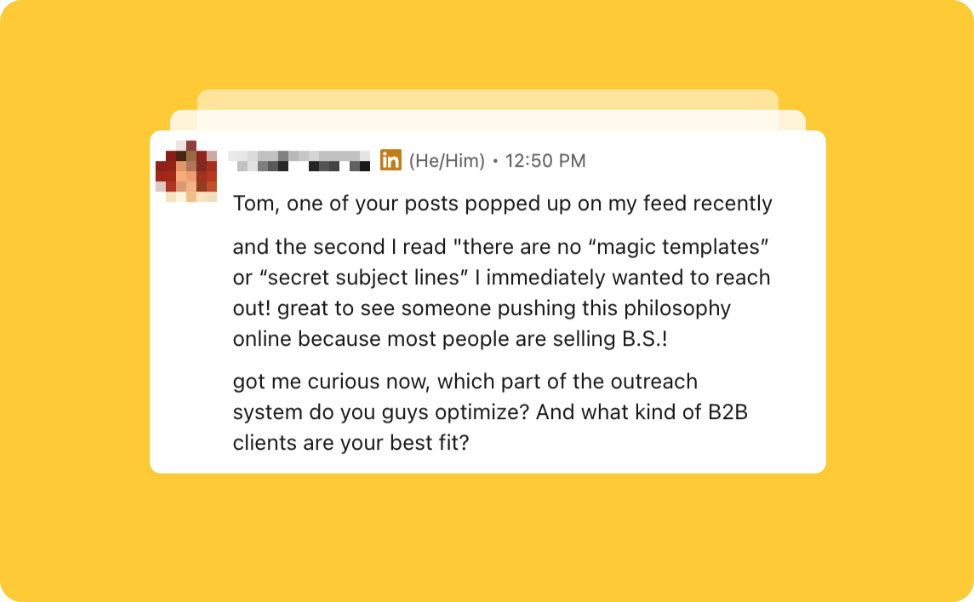
Other followups to try
- Try sending a voice note - they're so rare and the human touch goes a long way
- Send a video - get your face on camera (nothing feels more personalized that a video)
- Provide them an asset or playbook that gives them (the why, what and when - you implement the how)
- Reference a post you wrote or a podcast episode that provides them more insight on what you do (it showcases authority too)
- Or, send a simple follow up that speaks to the outcomes you provide
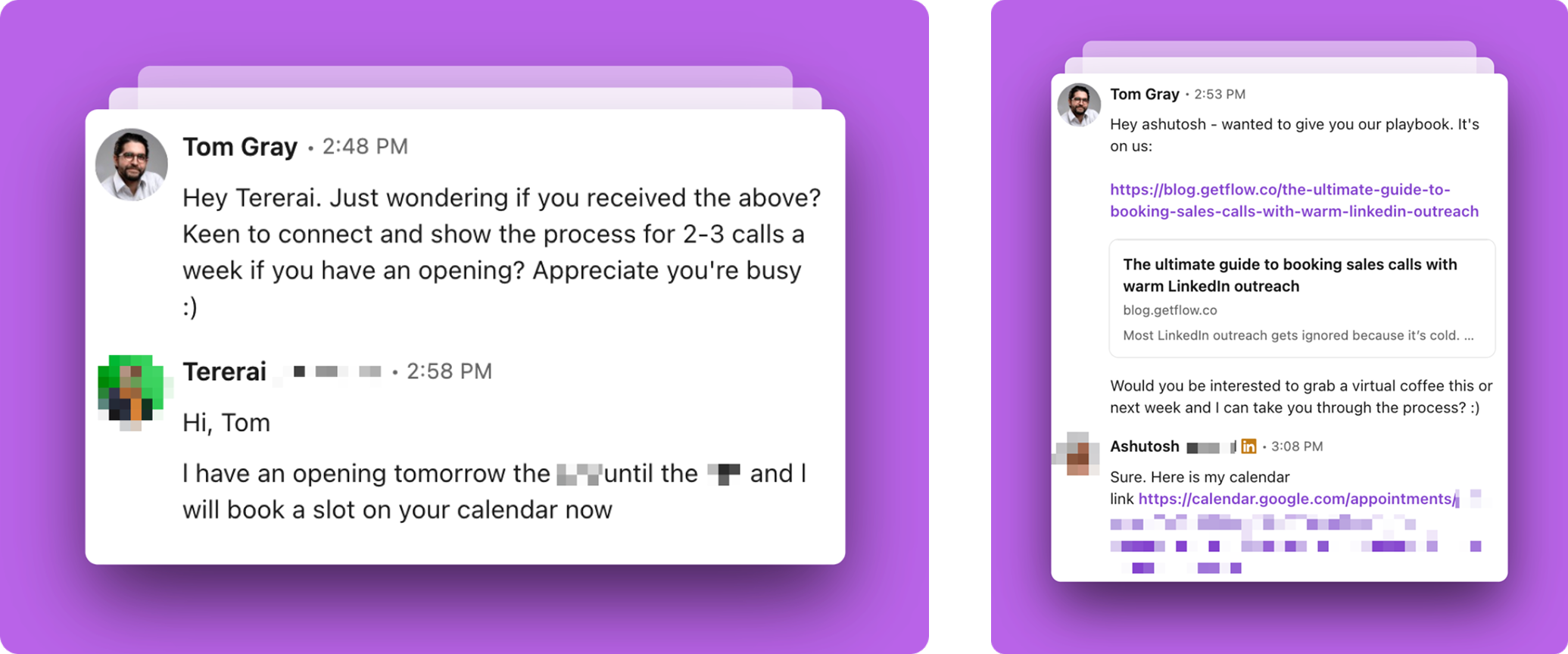
I cannot emphasize enough how important follow-ups are.
The reality? People are busy, and chances are they simply haven't gotten around to responding yet.
Here’s an example of prospects that took a month to respond:
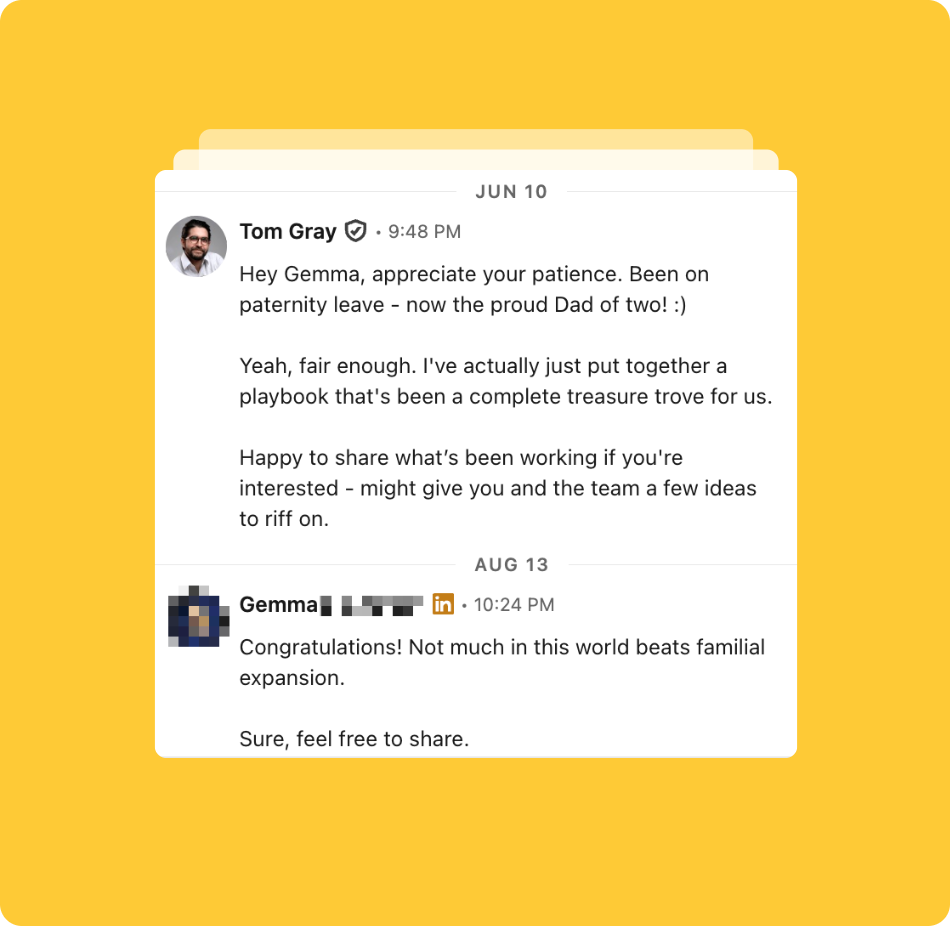
If totally dead in the water, I move on and mark them Lost in Connections.
Step 7. Positioning a call
Once a prospect has shared a problem or a goal, the final step is booking a call.
How to offer a call:
- Make it low-pressure – It should feel like a conversation, not a commitment.
- Give a clear next step – Instead of “Let me know if you’re interested,” I ask if they’re open to a quick call.
Example call invite:
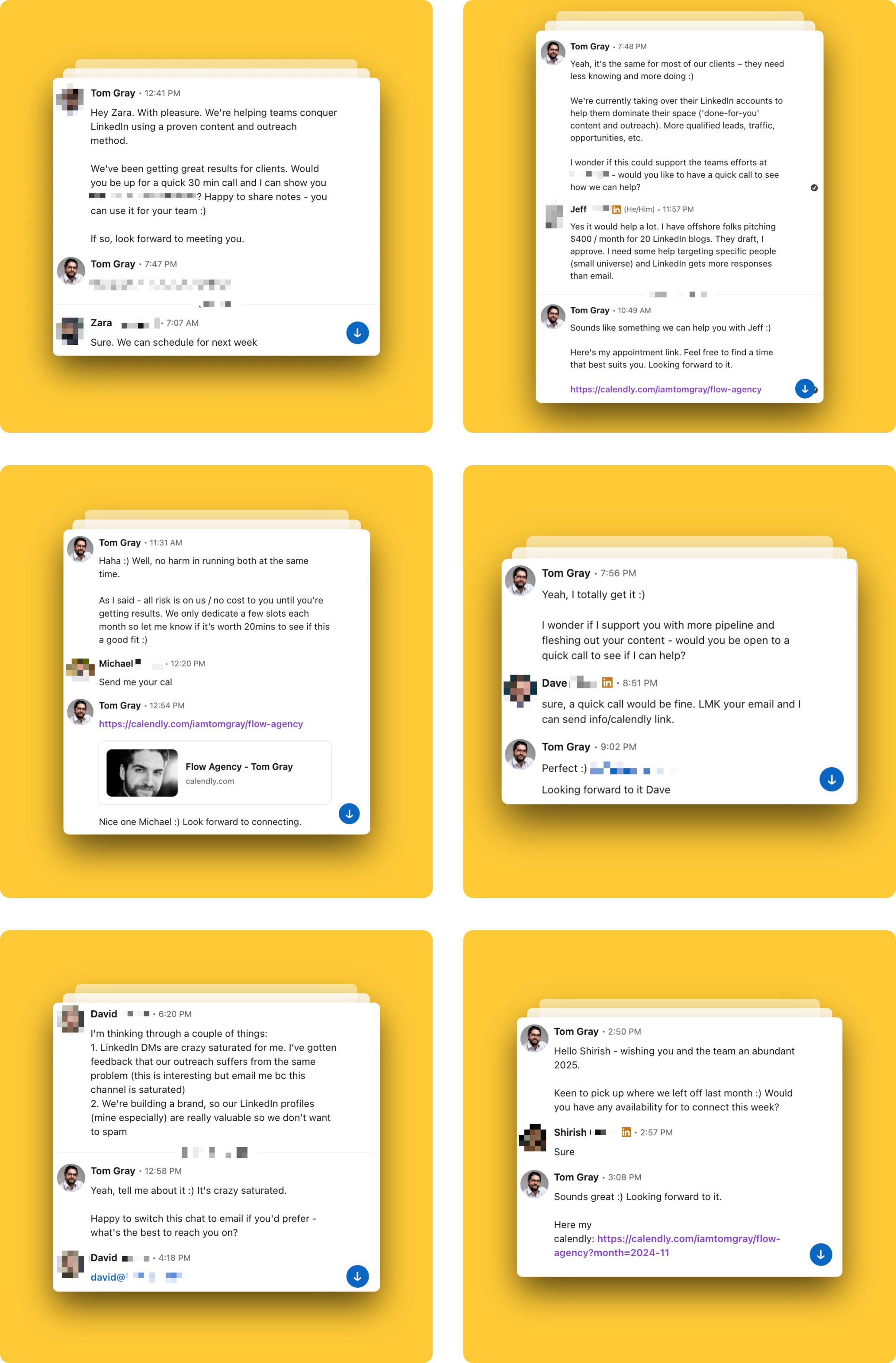
When the conversation feels natural and they’re clearly interested, you can softly invite them to a chat. Use one of these:
Inviting them to a call
- “Happy to share what's been working for us if it can give you and the team some ideas to riff on”
- “Up for sharing notes if you wanna grab 20 mins together sometime this or next week.”
- “More than happy to share our [process/playbook]. If it can help you and the team some ideas to riff on?”
⚠️ Important: Always wait for their reply before dropping a link. The goal here isn’t to pitch - it’s to keep the conversation human and mutual.
If they agree, I send them a link to book a time. (Mine is saved as a snippet, so it’s one click away.)
If they say no, I keep the relationship warm for future opportunities. (There’s literally no harm sending “Wishing you all the very best for the coming weeks. Bye for now.”)
I also teach my clients proven techniques (if you don't already use them) that create urgency, scarcity, and motivate prospects to take action, without being pushy.
Managing responses in my pipeline
Flow’s CRM tracks most of this automatically. After each response I update their status in Connections to reflect the next step:
- If they book a call → Change their status to “Won”
- If they’re interested but not ready yet → Leave them as “Pending” and keep them warm from the Follow Up tab
- If they aren’t interested or don’t respond → Change their status to “Lost”
And so on.
This ensures I always know where each conversation stands and never lose track of potential opportunities.
Running this playbook from ChatGPT or Claude
Everything above can also be run from the AI assistant you already use. Connect Claude, ChatGPT or your favourite AI assistant to Flow’s LinkedIn MCP once, and you can run your outreach just by prompting it: find leads, build lists, start outreach and handle replies.
It still runs through your own LinkedIn account, at the same human pace and daily limits as the app.
Connecting it
- In Flow, go to Settings → Connect AI Assistant, pick your assistant’s tab, and press Create key.
- Follow the steps on that tab to add Flow as a connector. In Claude, it’s Settings → Connectors → Add custom connector.
- Switch Flow AI on in any chat and start asking.

The full walkthrough is in the Connect AI assistant docs.
Prompts I use for each step
- Step 1, finding prospects: “Find me 100 sales leaders on LinkedIn who work in SaaS, based in California, with a company size of 10 or more.”
- Step 2, warming them up: “Add these leads to a new list called ‘SaaS sales leaders in California’, assign all my connected team accounts, and run the outreach.”
- Steps 3 and 4, the first message: “For everyone who accepted this week, draft a first message: a specific compliment on their latest post, then ask how [goal] is going - is it going well? Max 3 lines. No pitch.”
- Step 5, replies: “Draft personalized replies in my voice to everyone who replied to me yesterday showing interest. I’ll review them, then let’s schedule them for Monday at 9am.”
- Step 6, follow-ups: “Who hasn’t replied in over a week? Pull their latest post and draft a follow-up that compliments it.”
- Tracking: “How are my acceptance and reply rates looking this month?”
All while keeping you in control. Nothing sends without your approval.
Put it on a schedule
In Claude, you can go one step further and make it a scheduled task. For example, every weekday at 8am: “Check Flow for new replies and draft a response to each using my playbook.” You start the day with drafts waiting for you to review and send.
Because your assistant can use your other tools too, you can connect LinkedIn to the rest of your GTM stack and let it run while you sleep. For example:
“Every day at 6am, using Apollo, find me 100 leads that match my ICP, add them to Flow AI and run LinkedIn outreach. Assign it to my whole team. Then, check who’s accepted our connection requests, add them to the email sequence in Instantly, and create a new deal for each of these inside HubSpot. Oh, and when you’re done, notify the team in Slack.”

(Must read!) The 7 rules of LinkedIn outreach
Outreach works best when it’s consistent, personalized, and structured.
But even with the right process in place, if you begin defying some of these basic rules, it can lower response rates and make conversations feel forced.
To keep my outreach as effective as possible, I follow these best practices.
1. Approach outreach with curiosity, not salesmanship
People ignore sales-y messages because they feel like a pitch, not a conversation - it makes them feel insignificant (remember the Earl Nightingale quote above). Instead of acting like I already have the perfect solution for them, I take a curious approach.
- Wrong: “I’m confident I can help you get more leads.”
- Better: “I’d be curious to see if I can help, worth us grabbing 20 mins together next week?”
This small shift makes a big difference.
It removes pressure from the prospect and makes them more open to talking.
2. Personalize every message
People can tell when a message is copy-pasted. If it looks like I’m sending the same thing to 100 people, they’ll ignore it.
I try to make sure every message has:
- A specific compliment about their content, profile, or work
- A relevant question tied to their industry or challenges
- A natural tone that doesn’t feel robotic
For example:
- Wrong: “Hey [Name], love your profile. How’s business going?”
- Better: “Hey [Name], I saw your post about [specific topic], really liked your perspective. Nice job :) How’s [specific goal] going for you - are things progressing well?”
3. Keep messages short and easy to read
If a message is too long, it won’t get read - it's too much effort for them, and looks like a pitch-slap. I aim to keep my first message 2-3 short sentences. The goal is to start a conversation, not explain everything in one go.
- Wrong: “Hey [Name], I saw your profile and wanted to connect / build my network / have nothing else to say. I run a consultancy that helps companies generate leads through LinkedIn - me, me, oh wait, more me! We work with [company type] to create a repeatable system for booking calls. Let me know if you’d be open to chatting to buy our stuff.”
- Better: “Hey [Name], [short compliment they’d care about]. Congrats :) How’s [goal] progressing - Is it going well?”
Simple messages get more replies.
4. Focus on booking calls, not selling in DMs
DMs aren’t the place to pitch or close deals. Did pitch once in the examples above, except when asked to?
My only goal is to start a conversation that leads to a call.
- Wrong: “We help companies improve lead-gen. Want to see how we can help you?”
- Better: “I’d love to learn more about how LinkedIn lead-gen has been going for you guys - is it going well?”
By keeping it low-pressure, it makes it easier for prospects to say yes. There are times, however, when asking “Want to see how I can help you?” can work. But a simple principle I follow is to inject some carefully positioned social proof as part of your next question.
For instance, you might say "Yeah, a lot of our clients were experiencing that issue too. Would you be interested in learning the process we use to help them achieve [goal]?"
One I use a lot as it's very effective: "Yeah, LinkedIn lead-gen took us months of trial and error before we cracked it. Can't lie - it's proving a complete treasure trove. Happy to give you our process if it's worth grabbing 20 mins this week?"
It takes the emphasis away from selling and makes it more about education, 'helping a friend out', sharing insights or notes, etc.
5. Ask close-ended questions to make it easy to reply
If I ask an open-ended question, people are less likely to respond because it takes more effort. Instead, I ask yes/no questions to make it simple.
- Wrong: “How’s LinkedIn working for you?”
- Better: “Is LinkedIn lead-gen going well for you?”
Close-ended questions make it easier for people to reply quickly, which keeps the conversation flowing.
6. Track every conversation to avoid missed opportunities
The best outreach strategy in the world won’t work if I don’t track my progress. Keeping an organized pipeline prevents me from:
- Forgetting to follow up
- Losing track of warm prospects
Every time I send a message or get a response, I update my pipeline to reflect the next step. Flow AI's CRM does most of this for me. Statuses update automatically as conversations progress, and the Follow-up queue surfaces leads I haven't replied to, ordered by who's been waiting longest. Flow's dashboard also gives you the numbers at a glance: acceptance rate, reply rate, close rate, and active conversations, all filterable by list and sender.
7. Be a real person, not a boring corporate robot
People want to connect with humans, not sales reps - we’re hard wired social creatures in desperate need for validation (don't think you're not one of them). Anyone who thinks otherwise is kidding themselves, or enlightened.
The more natural my messages feel, the better my results.
I keep my tone conversational by:
- Dropping the corporate jargon (“synergy,” “solutions,” “cutting-edge”, "streamline efficiency" or anything that sounds like AI)
- Writing like I talk, short, direct, and conversational
- Injecting some personality if it makes sense (e.g., a light joke or friendly tone). No one died from being charming.
For example:
- Wrong: “Hi [Name], I wanted to reach out regarding your organization’s sales pipeline efficiency and discuss potential synergies that could drive growth.”
- Better: “Hey [Name], well done on the recent round. Exciting (and busy) times ahead for you and the team no doubt. Huge milestone. Congrats :)
Loving your content -btw. I'd imagine you're generating a ton of calls from that - is it going well?”
When my messages feel natural, prospects respond naturally.
Final thoughts
Outreach on LinkedIn is one of the most effective ways to book more sales calls.
Instead of blasting cold messages to strangers, I focus on people who are already engaging with me, making conversations easier and response rates higher.
The biggest concern people have with this is that it’s “not fast enough”, but having been round and round for months on end, you’ll save a lot of time on cold prospecting that feels fast, but produces no results.
You have to learn the rules of engagement - you don't get to dictate them. But you can speed things up and make it way easier with the right tools and systems.
Here’s the full process at a glance:
- Find the right prospects – Flow AI’s lead search, plus the people already engaging with you.
- Warm them up and track every outreach attempt – Run Outreach handles the warm-up. Keep your pipeline organized (Flow AI’s CRM handles this automatically).
- Create the ice-breaker – Open with a personalized compliment that makes them feel seen.
- Ask the qualifying question – Uncover a goal or pain point with a simple, easy-to-answer question.
- Handle responses properly – Guide the conversation toward a call.
- Follow up the right way – Provide value, not “just checking in” nudges.
- Position and book the call – Keep it low-pressure and give a clear next step.
This isn’t about mass messaging or hoping to get lucky.
Cliché ALERT: It’s about starting real conversations that lead to real business opportunities.
When implemented correctly, this approach generating an average 5-10 natural conversations a day and 2-3 high-quality sales calls per week for clients, without feeling forced. At the time of writing, we booked 22 calls last month with one account using this method.
Whenever you’re ready, here are two ways I can help you:

Tom Gray
Co-founder, Flow AI
If your outreach feels stuck and you don’t know how to fix it, the answer might be simpler than you think.
Done for you
I run your outreach for you
I’ll define your ICP, run your outreach in your Flow AI account, and shape all the messaging, including helping you reply, so the calls come to you.
Done with you
You run it, I’ve got your back
Send me any messages you want a second pair of eyes on and I’ll review them with you. Then I’ll help you stress test your outreach until it’s booking you a steady stream of calls you can rinse and repeat.
🕒 This article was updated about a week ago